Target and Source Maps
Mapping Specification Overview
A fundamental element in any data migration scenario is the way it is specified how to migrate the source data to the target data.
The success of any data migration is directly linked to the quality of this specification and how it is translated into the executable that performs the actual data migration. This is only underlined by the fact that this specification often grows to enormous size and complexity. It is difficult to maintain validity and coherence in the specification itself. Most importantly: In many cases, it proves impossible to maintain complete fidelity in the consistency between the specification and the executable.
The Studio contains rich cross-reference and cross-validation functionality to ensure a very high degree of consistency and coherence in the mapping. Most importantly, the Studio enforces mapping of an extremely structured nature. In fact, the specifications are so structured that they serve as input to a code generator that generates the migration executables.
It is a key quality of Hopp that the consistency between the mapping and the actual executable is inherently guaranteed.
Collaboration
Studio is a Windows application running locally on a PC or laptop. The mapping produced by the Studio is a collection of (xml) files residing locally on the user’s machine.
While this enables an individual user to work on a given mapping locally on his/her Windows machine, the Studio can be backed by a central repository (a SQL Server database). The repository provides the functionality necessary for a team to collaborate on the same mapping (checkout, check-in and get-latest).
The investment in the mapping can be safeguarded by implementing a suitable backup scheme using the given facilities in SQL Server.
Mapping Types
In the case of repeated data migrations from varying source systems to the same target system, it is crucial that a clear separation exists between the mapping for source data and the mapping for target data.
Using Studio, the mapping for any data migration is separated into two different mapping types ensuring the highest degree of reuse of these specifications from migration project to migration project.
Target Map
The Target Map is founded on the description of the Target data.
The Target Map eliminates internal references and data that can be derived from other data and exposes the data that cannot be derived and thus must be received. In addition, the Target Map can implement a wide host of runtime validations to ensure the highest quality possible of the target data being produced by the data migration.
The Target Map is strongly linked to the target system and this mapping can be reused in all migrations to the same target system. The value of improving/extending the Target Map is retained over time, from project to project.
From Studio, it is possible to export the Target Map in two ways:
- As an interface specification that can be imported into Studio when working on the Source Map (see below)
- As a complete, structured specification that serves as input for the engine generator generating the target migration engine
Source Map
Source Map is based on both the source data descriptions as well as the data requirements exposed by the Target Map.
While the target mapping exposes the data that must be received, it does so in terms of the target system. In addition, all validation is founded on value sets known by the target system.
On the other hand, the Source Map describes how - based on the source data - to produce the data required by the target map.
Finally, the export can be exported from the Studio as a complete, structured specification as input for the engine generator generating the export engine.
Quality Tools
Mapping commonly grows to significant size and complexity. In many cases users need to communicate around the specifications – for instance, users with knowledge of the target system may need to communicate with users with knowledge of the source system.
Studio works as a frame around the different mapping types providing rich facilities useable across the different mapping types.
Cross-reference
Studio provides where-used, cross-referencing capabilities. These capabilities are useful as the mapping grows in size, providing support for where-used analysis and general control over complex mapping often lacking in other specification tools.
Validation
Using Studio any user can perform a complete validation of the consistency of the mapping. Validation errors indicate that code generation may fail or the generated code may fail to build.
For this reason, the validation is an integrated part of the workflow. In addition, the validation in combination with the checkout/check-in collaboration facilities provides support for what-if scenarios.
A user can check out an item (or any number of items), perform some modification – for instance import a new version of the target data structure - and then perform a validation. The validation report will give a good indication of the impact of the changes, and in case of unforeseen consequences for the consistency of the mapping, the user can simply undo the previous checkout and revert to the previous state of the mapping.
Reporting
Studio provides a palette of reports common for all mapping types as well as reports specific for each mapping type. The reports provide support for communication with other users not in contact with Studio.
Using Studio, items can be annotated with descriptions and comments adding value to extracted reports.
Target Map Overview
The purpose of the Target map is to specify how the data to be delivered to the Target System is to be created. So, the first step in any target mapping is to import the metadata describing the Target System.
Once that is done, you will create the hierarchy of Business Objects to specify the target mapping for each Business Object. For each Business Object in a hierarchy, you will define the Interface Fields you need to create the data for the Target System.
Next, you will link these Business Objects to structures in the Target System by creating Target Objects and deciding how to create the value for each Target Field on each Target Object.
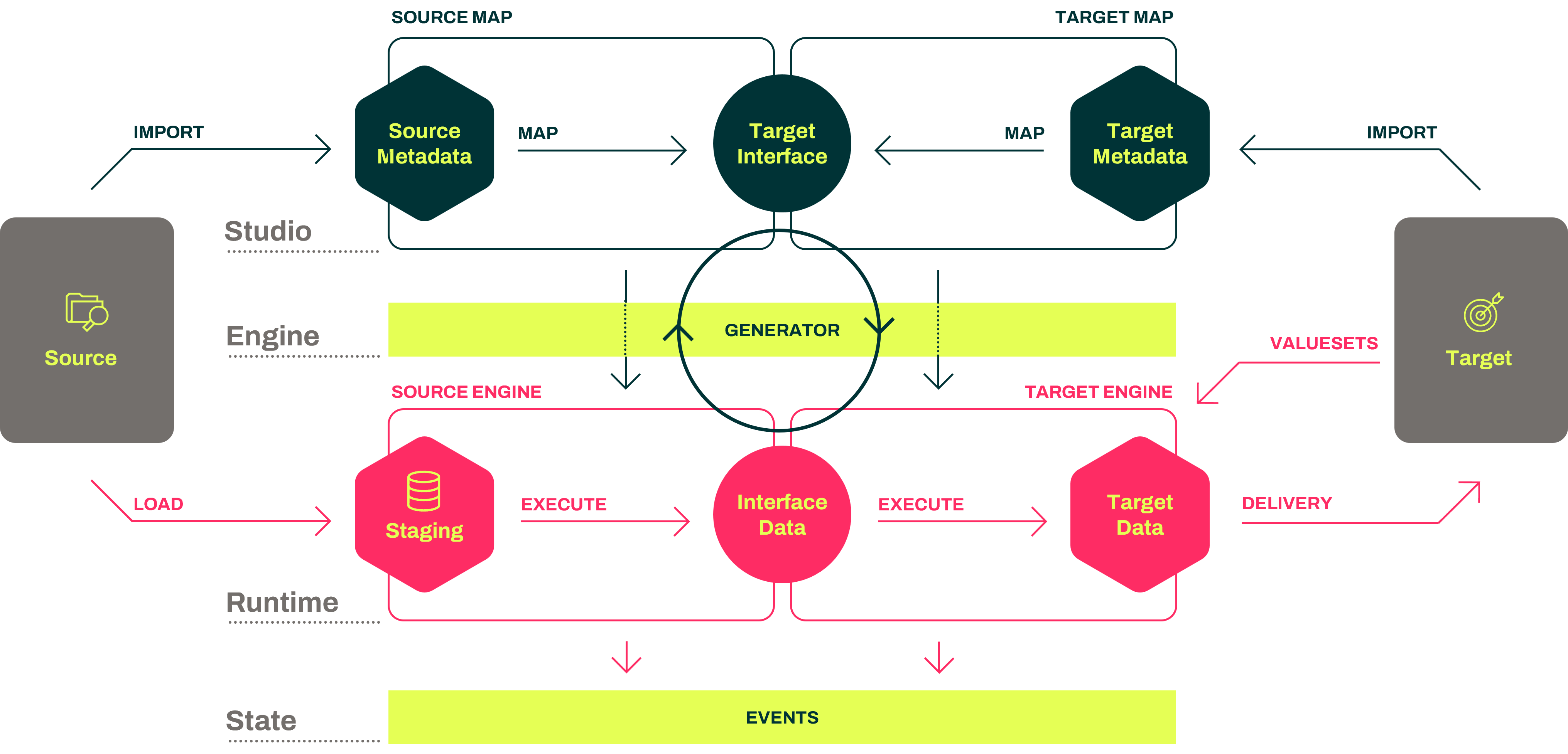
When creating the Target Map in Studio, it is worth remembering what will happen later when the Runtime actually executes the migration, as illustrated by this diagram:

The essence of the Target Map in Studio is to import the metadata describing the data structures to deliver to the Target System and then map these metadata to the Target Interface. The Target Map expects to do this job.
The next thing that happens is that, based on the Target Map, the Engine Generator generates the Target Engine. At run time, the Target Engine does exactly what was specified in the Target Map. Receiving data that conforms to the Target Interface, the Target Engine executes and produces the Target data to be delivered to the Target System.
The Target Map is hugely important. It defines the Business Object hierarchies upon which everything else is built. In any real-life migration project, you should put considerable effort into designing the hierarchy of Business Objects.
There are some fundamental rules when building the Target Map:
- The Target Map reflects the structure and requirements of the Target System(s) only.
- The Target Map exposes an interface and validates that data received through this interface.
- The Target Map knows nothing of the source data and will not make any assumptions based on source data.
Target Map Semantics
The Target Map is the starting point for all specifications. It is the responsibility of the Target Map to ensure that the data produced by the migration is valid and can be delivered to and accepted by the target system without late-occurring errors. It is normally the most extensive of the two map types in Hopp but also the sole mapping to be reused, if the same target system over separate migration projects may receive data from different source systems.
Starting out a Target Map completely from scratch implies importing the specification of the target data structures that the data migration should produce. These data structures can represent anything, for instance tables in a database, parameter lists, routine calls, etc.
It is the core purpose of the Target Map:
- to define how to produce data for these structures, when the migration executes.
- to enforce runtime validations to ensure that the target data produced is acceptable by the target system.
In addition, it is the Target Map that creates the business object hierarchies that serve as a mainstay for the entire specification, execution and presentation of the migration result.
Developing the Target Map involves these main tasks (avoiding an abundance of detailed tasks):
- Manually define the hierarchies of business objects.
- For a given business object, point out the target system structures that this business object will deliver data to.
- For each target data structure, determine how to assign the value for each field in the structure. Many ways exist to internally derive/calculate these values from other values inside the target specification.
- In the case a given value cannot be derived/calculated in any way, this value surfaces as an upstream requirement for data to be received. This is done by manually create a so-called External Field on the business object.
- In some cases, values, can be retrieved from other, related business objects. In these cases, it is possible to create relationships between business objects and use these relationships to retrieve values. Relationships automatically evolve into execution dependencies to be respected by the Runtime.
The generated target engine contains the code to receive the exported data and call rules etc. as specified to produce the target result.
Publishing the Target Map for import into a Source Map is in fact just publishing the hierarchies of business objects with their external field requirements.
Target Map Discussion
Based on the concept of the Hourglass that shows the complete path from the source system to the target system, let's explore the Target Map and understand how we transition from the complex target system to a simpler interface.
The Target Map serves as the conduit for delivering data to the target system, which comprises numerous tables or structures. At this stage, we are primarily concerned with metadata and not the specifics of these tables. The metadata describes the data that needs to be delivered, whether it's in the form of database tables, parameter lists for procedure calls, or any other representation.
Discussions about the intricate technical structures are avoided as they are numerous and not conducive to conversations regarding business data migration. Instead, our focus is on Business Objects.
These interface fields represent the data we need to receive in order to process the Business Object in the Target Map and deliver the corresponding data to the target system. Now, how do we achieve that? Suppose we are at a particular position within a given Business Object. To deliver one row of data, we create a target object within the Target Map, specifically on the corresponding business entity. We inform the Target Map that this target object is responsible for delivering one row to the designated structure in the target system. When we create this target object, the Target Map automatically retrieves the fields associated with that structure in the target system, providing us with a list of these target fields.
These target fields represent the specific fields within the structure where data will be inserted or modified. While the details of value assignments are beyond the scope of this discussion, rest assured that you have access to all the necessary value types to complete this task.
Suppose, for instance, that another business entity needs to deliver a row to a different structure in the target system. This scenario is handled similarly. We create another target object that resides within the corresponding business entity, and it will be responsible for delivering data to the designated structure. Once again, we are presented with a list of target fields for value assignment.
It is also possible for multiple Business Objects to deliver rows to the same table or structure in the target system, or for a single business object to deliver multiple rows to the same structure. These scenarios are fully supported. Through the target objects, we establish a true many-to-many relationship between the Business Objects in the target map and the structures in the target system to which we need to deliver data.
Source Map Overview
The primary purpose of the Source Map is to generate the data that your Target Map requires, as outlined in the Target interface. In the Source Map, you will import the Target interface that you have just published from the Target Map, and also import the metadata that describes the structures in the Source System. In the diagram below, the Source side of things (on the left) is added to the previous diagram used in the Target Map Introduction (on the right).
Regarding the Source System metadata, it is worth considering how things will work in the future.
The Source Map you are working on in Studio will produce the input to generate the Source Engine, which in turn will do this part of the job when the migration is running. And here's the point: As part of doing the job, the generated Source Engine will create and maintain a staging database with a table for each structure in the Source System metadata and load the data received from the Source System into these staging tables.
Once data is loaded, the Source Engine will perform the Export part of the migration by applying the Source Map to these staging tables to produce the Interface Data that conforms to the Target interface. The generated Target Engine will then take it from there.
It is beneficial to remember the above insight when you start working in the Source Map. You will, in fact, be specifying how to extract the data from the staging tables to deliver the data conforming to the Target interface published by the Target Map. As an extra little twist, the Source Map enables you to create Views. A view is nothing more than extracting data from one or more staging tables and placing this data in yet another staging table.
Source Map Semantics
The Source Map is built on two different inputs:
- The published data requirements from the Target Map.
- The imported data structures from the source system.
The core purpose of the Source Map is to define how to meet the data requirements of the Target Map using the data structures in the source system.
The Business Object hierarchies are defined in the target specification, with the alterations imposed by the transformation specification presented in the Studio. For each business object in the hierarchy, how the external fields of the business object will be assigned a value must be specified.
For this purpose, the Source Map contains an export-specific toolset. Source data structures can be aggregated into views and these views and source tables themselves can be connected to business objects to provide the data necessary.
The generated export engine resulting from the Source Map contains these main parts:
- A generated SQL Server database containing:
- A generated table for each source data structure.
- For each view defined in the Source Map:
- A generated table to contain the data for the view.
- A generated stored procedure to populate the table with the data.
- For each business object in the specification stored procedures to retrieve the source data necessary to satisfy the data requirements for the business objects.
- Generated C# code
- to execute the stored procedures to populate the views.
- to execute the stored procedures to retrieve source data for the business objects, call rules as specified and populate the business objects with field data to complete the export result.
Source Map Discussion
This is the second step in building Maps for Hopp. In the Target Map Discussion, we described how the Target Map, based on metadata from the target system, exposes an interface that describes the required data for delivering it to the target system.
Now, let's delve into the Source Map to understand how it transforms and delivers data, conforming to the interface provided by the target system.
The Source Map consists of metadata describing the source system at the top, while at the bottom, we have the target interface exposed by the target map. This hierarchical structure contains various business objects, each with its own set of interface fields.
The task at hand is to assign values to each of these fields. We work on source objects for each business object in the target interface. What does that mean? Well, for a Business Object in the source map, you create a corresponding source map specific to that Business Object.
This Source Map is associated with the respective business object and connects to the metadata in the source system. For example, if we aim to generate one instance of the business object hierarchy for each role in a table, we create a root source object on the source map linked to this metadata structure. There's flexibility to modify this approach, such as applying predicates or other conditions to determine which rows will generate instances of the business object hierarchy.
Additionally, if we need to access data within this structure in the source system, we create another source object on the source map for the corresponding business entity or object. Once added, we must link this source object to the root source object. This linkage determines which fields in the parent source object will be used to look up a role in the child source object. This hierarchical linking can be repeated, defining the relationships from parent to child through source objects.
Connecting a source object to a structure in the source system provides access to the source fields residing within that structure. These source field values can be utilized to calculate the values for the interface fields.
So far, we've covered the process of creating root business objects. But what if it's a child object, like the one mentioned? Well, the initial steps remain the same. We create a source map for the child business object, establishing a root source object connected to a table in the source system.
However, as this is a child object, we now need to specify the link between the parent and child. From the root source object in the child's source map, we connect it to one of the source objects in the parent's source map. Any suitable connection can be established. In this case, let's connect it to the mentioned child source object. Consequently, on this link, we define which fields in the source data metadata structure are used to look up rows in the same structure, allowing us to create instances of the child business object.
Remember, this hierarchy enables the child object to extract data from other structures in the source system.