Secrets and Constant Replacement
You can use monikers to place Constants and Secrets into Literal values and Constant values.
By monikers, we mean one of these two options:
| Moniker | Sample |
|---|---|
{constant:ConstantName} | You can assign a Literal value like cast('{constant:MigrationDate}' as date) |
Both static constants and Run Parameters can be referenced this way.
| Moniker | Sample |
|---|---|
{secret:SecretName} | For instance, you can edit the value of a Run Parameter in Operations to contain "Data Source=ServerName;User ID=SqlUser; Password={secret:SqlPassword} |
A Secret is a named value, and the value of the Secret is maintained in the Portal Configuration.
Constants
At runtime, Hopp will resolve the constant monikers and replace the monikers with the actual constant values.
This resolution is recursive, so it is entirely possible to use monikers to reference constants that themselves contain monikers to reference other constants.
Constant resolution and replacement always take place - contrary to Secret replacement that only takes place when calling DataServices, see below.
Secrets
Hopp loads Metadata and dynamic Valuesets from DataService Provider extensions. A Provider to read Metadata and Valuesets from Excel is baked into Hopp from the beginning. Hopp can provide additional DataService Providers to get Metadata and Valuesets from for instance SQL Server, Oracle or DB2. Finally, bespoke DataService Providers can be developed to get Metadata and Valuesets from other sources.
The SQL Server, Oracle, and DB2 DataServices from Hopp all require a connection string as parameter. In some cases, it may be necessary to add sensitive information - a password - to a connection string. Other DataServices may also require sensitive information in parameters.
This poses a problem because the DataServices parameters are visible to all users in Studio and - if provided via a Runtime Constant - also visible to all users in Operations and even Business Users in the Portal. To get around this, Hopp supports Secrets.
Using Secrets
A Secret can be used in input parameters for DataServices by using this moniker in curly braces: {secret:name}
where name is the name of the Secret in the Portal Administration.
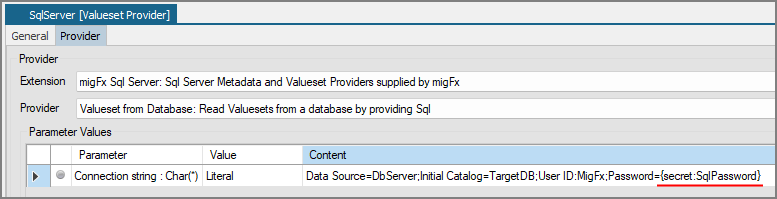
The secret moniker can be used either directly in a Literal Value:
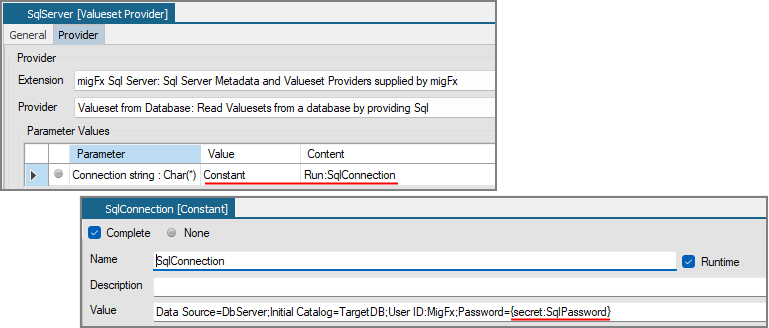
Or the moniker can be used indirectly in a Constant:
Resolving Secrets
Secrets must be resolved when the DataServices Provider is invoked, and the parameters passed. Either by the Runtime or in Studio, when Metadata is imported or Valuesets are tested.
Resolving Secrets in Runtime
When a Dynamic Valueset is loaded in the Runtime, the Runtime will parse the parameters for the provider and replace all secrets with their actual values. The Runtime will fail the job if a secret is not found.
Note: For secrets in Runtime Constants, it is important to stress that secrets are only parsed by the Runtime when calling DataServices. If a Constant is used elsewhere - in the mapping - no parsing and replacement will take place. This is contrary to the replacement of Constant references, that always takes place - see above.
Resolving Secrets in Studio
The user can replace the secret moniker in Studio when loading Metadata:

And when testing a Dynamic Valueset
