Add and delete Target Objects and Child Business Objects directly from the Project Explorer
Child Business Objects and Target Objects can be added to a Business Object by opening it and going to the Children and Target tabs. This can also be done directly from the Project Explorer.
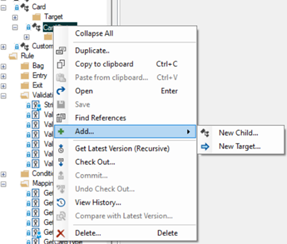
Likewise, a child can be deleted directly from the Project Explorer as well.
Note that all these actions will cause the Business Object to be automatically checked out. It follows, that they are disabled, if the Business Object is currently checked out by someone else.
You can also copy a Target Object using Drag and Drop or Copy and Paste. You can only copy the Target Object onto a Business Object that is not checked out by someone else. If necessary, the destination Business Object will be automatically checked out.
The consequences for the mapping are similar to copying a Business Object; depending on where the copy is placed, some of the mapping inside the copy may be broken and will have to be fixed. The Studio validation will clearly mark the places that must be fixed.