Loading Source Data
A crucial step in any migration using Hopp is to load legacy data from the source system into tables in the Hopp Staging Database. These staging tables in the Staging Database are automatically created by the generated Source Engine - based on the metadata that has been imported into the Source Map that is the basis for the generated Source Engine.
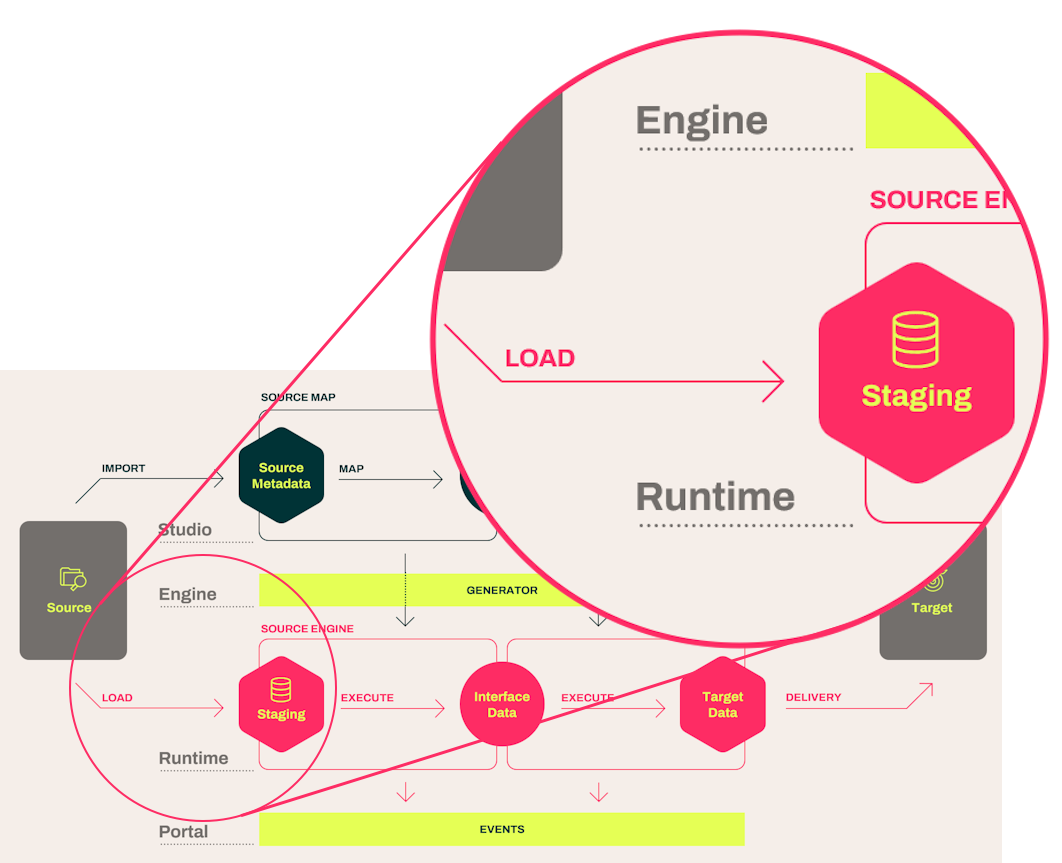
First of all, it is naturally vital that the data to be loaded actually conforms to the metadata that was used to generate the staging tables. Any significant discrepancy here will cause the data load to fail.
Once that little detail is out of the way, there are 2 ways that data can be loaded:
- From files
- Directly from a source database
Seen from Hopp, both ways are equally valid and fine. Which one to choose really depends on the requirements and constraints of the actual migration project.
A direct load from table in the source data base to table in the staging database will generally be fastest. But in many projects, security and compliance considerations can make the file-based load the better choice.
Technically, the core of Hopp does not really know where the data is coming from. Hopp merely exposes an extension point that makes it clear, exactly how data must be delivered in order to be loaded.
In-the-box Staging Loaders
This is of course not of much use in itself, so in the box with Hopp also comes a number of concrete implementations of this extension point that can actually load data.
These in-the-box Staging Loaders are
| Load Type | Loaders |
| File based load |
|
| Direct load |
|
Configuring a Staging Loader
A Staging Loader is just one of many types of extension that Hopp can discover and use. As an example, let's see how to set up and use the DB2 Direct Loader extension provided by Hopp.
All extensions - including Staging Loaders - must first be added to the Track in the Portal Operations. This is done in the Administration / Extension Usage for a given track.

In the Extension Usage panel, you first must choose the type of extension to manage in the dropdown, in this case a Staging Loader
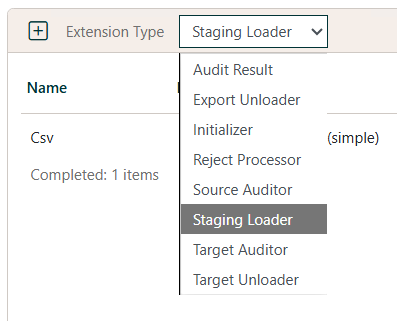
Once there, click the Add  button to add usage of a new
Staging Loader.
button to add usage of a new
Staging Loader.
This will open a dialog to choose and configure a Staging Loader:
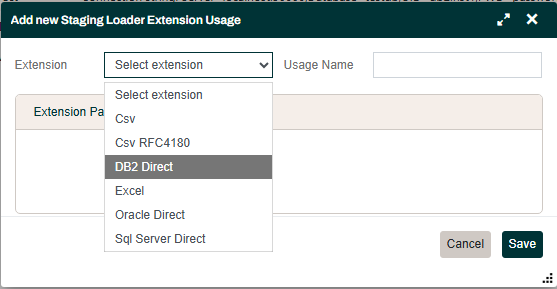
The Extension dropdown will list all the Staging Loader extensions available. For this example, we choose the DB2 Direct loader. This - and indeed all the loaders in the screenshot above - are provided by Hopp and will always be available.
Once a specific loader is selected, it will show the parameters it requires in order to function. For the Db2 Direct loader, it will look like this (but bear in mind that different extensions may ask for different parameters):
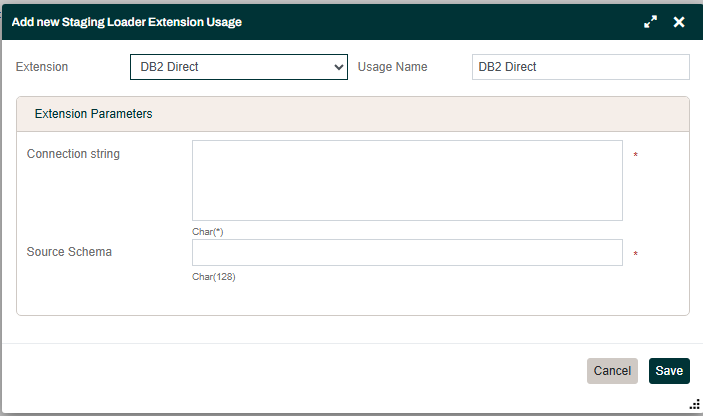
The DB2 Direct loader wants
- A connection string to the DB2 database. You can reference both constants and secrets in the value provided for the connection string (read more about this here Secret and Constant replacement)
- The name of the Schema in the DB2 database that contains the table that is being loaded Once these parameter values are provided and the usage saved, it is ready to use. You may add more than one usage of the same loader (in this example if you need to load from tables in multiple DB2 databases or schemas). The Usage Name allows you to name these to be able to distinguish later.
Using a Staging Loader
All Staging Tables are loaded from the Source / Data panel in the Portal Operations:

Use the context menu to set the loader for a staging table:

The list of staging tables will clearly show which loader is used for each table:
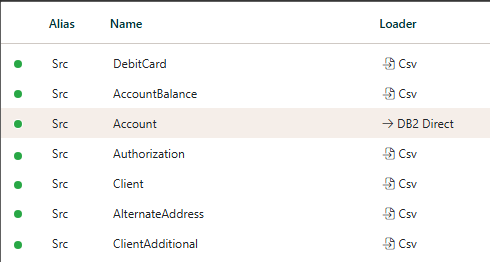
That's it, that is all there is to it.
Now, when the Src.Account staging table in the screenshot above is loaded, it will happen using the DB2 Direct Staging Loader. The loader will use the connection string provided and will look for the Account table in the DB2 database - under the schema provided.
Custom Staging Loaders
Up front warning: This is the techie part of this page. If you don't want to read about nerdy interfaces and base classes, you can safely skip this section.
The part of the implementation of a custom Staging Loader that makes it available for use in Hopp is really quite simple.
First of all, you need to reference the Hopp.SourceEngine NuGet package (or if using locally installed Hopp Libraries, reference the MigFx.Director.Server.Public.dll library).
Once this reference is in place, you can create a custom staging loader by creating a class that derives from one of these 2 base classes exposed by Hopp:
- BulkDataFileProvider: Derive from this class to implement a custom, file-based Staging Loader
- BulkDataDirectProvider: Derive from the class to implement a custom, direct Staging Loader
Both allows you to add parameters to your implementation that will be exposed in the Hopp Portal (like the connection string and schema of the DB2 Direct loader above).
And both requires you to implement an abstract GetReader() method that returns a valid implementation of the IDataReader interface that is generally exposed by .NET.
So, it is really simple to create and connect a Staging Loader to the Hopp Runtime. The real work is of course in the actual implementation of the IDataReader that your loader must hand back and that Hopp will use to get the data that will be loaded to the staging table.
As a sample, you can download the Hopp implementation of the DB2 Direct Staging Loader here: BulkDataDb2Provider.cs