Mapping and Execution Flow
When an actual migration is running, all of Hopp software components are used, each performing its individual task. This page provides an overview of the flow from mapping to execution.
The diagram below illustrates what actually happens when Hopp migration components are working together in a data migration project. Starting with mapping in Studio, generating code using the engine, executing the code in Portal Operations, and finally displaying the results in the Portal.
Starting from the top, the Studio application is used to produce the Source Map and the Target Map, based on metadata input from the target system and source system, resulting in the mapping specification.
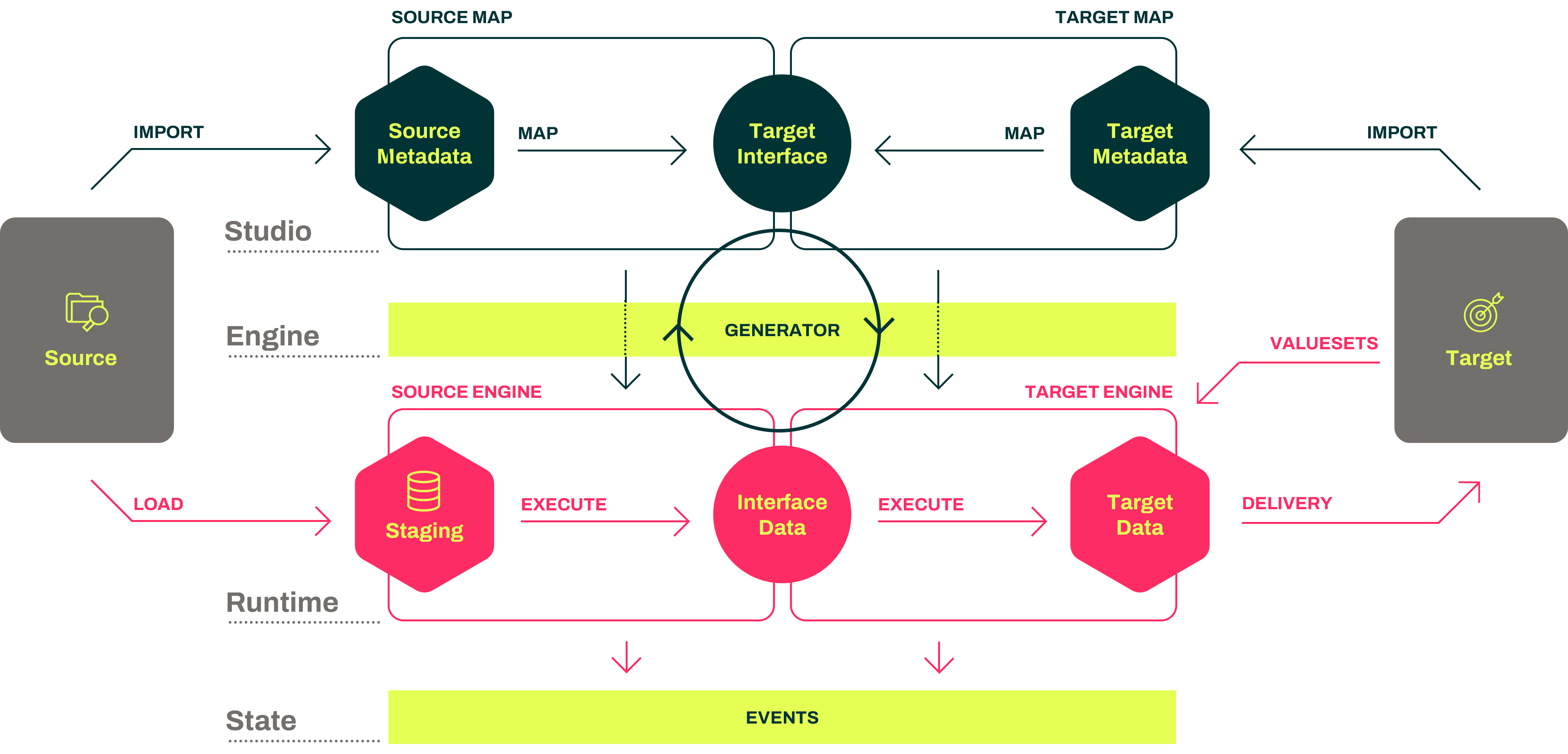
The starting point is the Target Map; start by importing the metadata that describes what the target system expects. Now requirements can be imported as CSV files, Parameters to an API call, etc. or the structure of a database table.
It doesn't really matter. It's just the data that needs to be handed over to the target system at some point. All that is required is to expose an Interface saying; give me this data.
When the Interface is defined, the next task is to figure out how to create and deliver the data that conforms to the target metadata. That's what you do in the Source Map.
Then, viewed from the Source Map, the target interface says, Now, you need to figure out how to deliver data to this Interface that conforms to the Interface specifications.
In the Source Map, you then import the Interface metadata, which describes what you need to receive from the source system. These are the structures that you are focusing on discovering in your landscape analysis because they are required for this migration to succeed (satisfy the target system).
All this work is done using Studio. It's all meta, it's all specification, it's all mapping. Once you're satisfied, and it validates, you can then publish the mapping to the Engine.
The engine generator will then generate a Target Engine and Source Engine. These two engines are code that is deployed into the Runtime environment so they can execute. Now we are stepping away from the green part of the illustration, which was metadata and mapping, and moving down into the red part, which is operational and executing data migration in the Portal Operations.
At the start of things, the source engine will automatically maintain a set of staging tables in a database that corresponds to the source metadata. This happens automatically. Suppose you import new source metadata into the source map during the lifetime of your project. In that case, the source engine will automatically update the staging database, so it keeps it aligned with the source metadata.
The data is then loaded. We receive data from the source system in some form, right? We expect to receive them as files, and we will load them into the staging database. We can load CSV files, Excel files, XML files, whatever.
You can also extend this so you can load formats that we don't know about yet, or you can extend it so you can connect to a source database and pull the data. There are many ways to get data into the staging database.
One point here is that we prefer to load the data in as raw a form as possible, with a minimum of logic in the extraction of data from the source system and letting all that logic happen in the migration give a better result and more visibility.
Then, once the data is loaded into the staging database, we execute the source engine, which extracts data from the staging database and performs the necessary transformations to produce data that conforms to the interface.
This is handed off to the target engine, which in turn executes and performs all the mappings and transformations to get to the target data that conforms to the target metadata. And that's basically it.
Then, as a generic tool, we kind of got as far as we can go. And the last thing is, of course, there needs to be a delivery mechanism that actually then ends up delivering the data to the target system. But that exact delivery mechanism is very much dependent on which target system we are talking about, because that can be done in so many different ways.
There is always going to be an extension point where you need to develop some kind of functionality to get from the data that we have to the data that can actually flow into the target system. Finally, when these end agents execute, they will produce what we call events that are then published into the Portal web application and visible to everybody in the Portal.
A final note
Note that the process of publishing and importing from one specification to another, from the Target Map to the Source Map, is very fast. In fact, flowing through all the steps from a modification in the Target Map, through the step of publish/import, and finally, the generation and deployment of new engines rarely takes more than a few minutes.